

Table of contents
Table of contents
Smart home projects are the step after blinking an LED. Instead of printing a sensor reading to the Serial Monitor, you put it on a wall display, send it to Home Assistant, or use it to switch something on. This guide covers which board to pick and 20 projects to build with Arduino, ESP32 and Raspberry Pi.
Why build your own smart home projects?
A DIY project does exactly what your home needs, not what a product manager decided. It also teaches you sensors, wireless, automation and code along the way.
- It solves a real problem. A leak under the sink, a forgotten plant, a garage that is too tight to park in.
- It is flexible. You choose the sensor, the display and where the data goes.
- It connects to what you already run. Home Assistant, MQTT, ESPHome, Node-RED or your own dashboard.
- It grows. One room sensor today, a whole-house dashboard next month.
Arduino, ESP32 or Raspberry Pi: which should you use?
All three have a place. The choice comes down to whether the project needs Wi-Fi and how much computing it does.
Use Arduino-compatible boards for simple control projects
An Arduino-compatible board is the easiest way to learn buttons, relays, LEDs and simple sensors. It suits classroom projects and basic automation that does not need to talk to anything else. When a project needs Wi-Fi, move to an ESP32.
Use ESP32 for connected smart home sensors
An ESP32 has Wi-Fi and Bluetooth built in, so it is the usual choice for sensor nodes, smart buttons, room monitors and anything that reports to Home Assistant over MQTT or ESPHome. Low-power ESP32 boards can run on a battery for months if they sleep between readings.
Use Raspberry Pi for hubs, dashboards and local services
A Raspberry Pi is a small Linux computer. It runs Home Assistant itself, Node-RED, databases, dashboards, camera projects and computer vision. It is the hub, not the sensor: it needs constant power and does more than a sensor node ever should.
Use Inkplate for always-visible smart home displays
Inkplate is an e-paper display with an ESP32 built in. E-paper holds its image with no power and reads like paper, so it suits wall dashboards, room signs, calendars, weather displays and energy boards that should be readable all day.
| Platform | Best for | Not ideal for |
|---|---|---|
| Arduino-compatible | Buttons, relays, LEDs, learning | Anything that needs Wi-Fi |
| ESP32 | Wi-Fi sensors, smart buttons, Home Assistant devices | Running a database or a full dashboard |
| Raspberry Pi | Home Assistant, Node-RED, cameras, logging | Small battery-powered sensors |
| Inkplate | Always-on dashboards, calendars, signs | Video and fast animation |
20 smart home projects with Arduino, ESP32 and Raspberry Pi
1. Home Assistant room sensor
An ESP32 reads temperature and humidity every minute and sends them to Home Assistant. It is the best first project: one board, one sensor, and a graph in Home Assistant by the end of the evening. NULA Mini ESP32-C6 and the SHTC3 sensor connect with one Qwiic cable, no soldering.
2. E-paper smart home dashboard
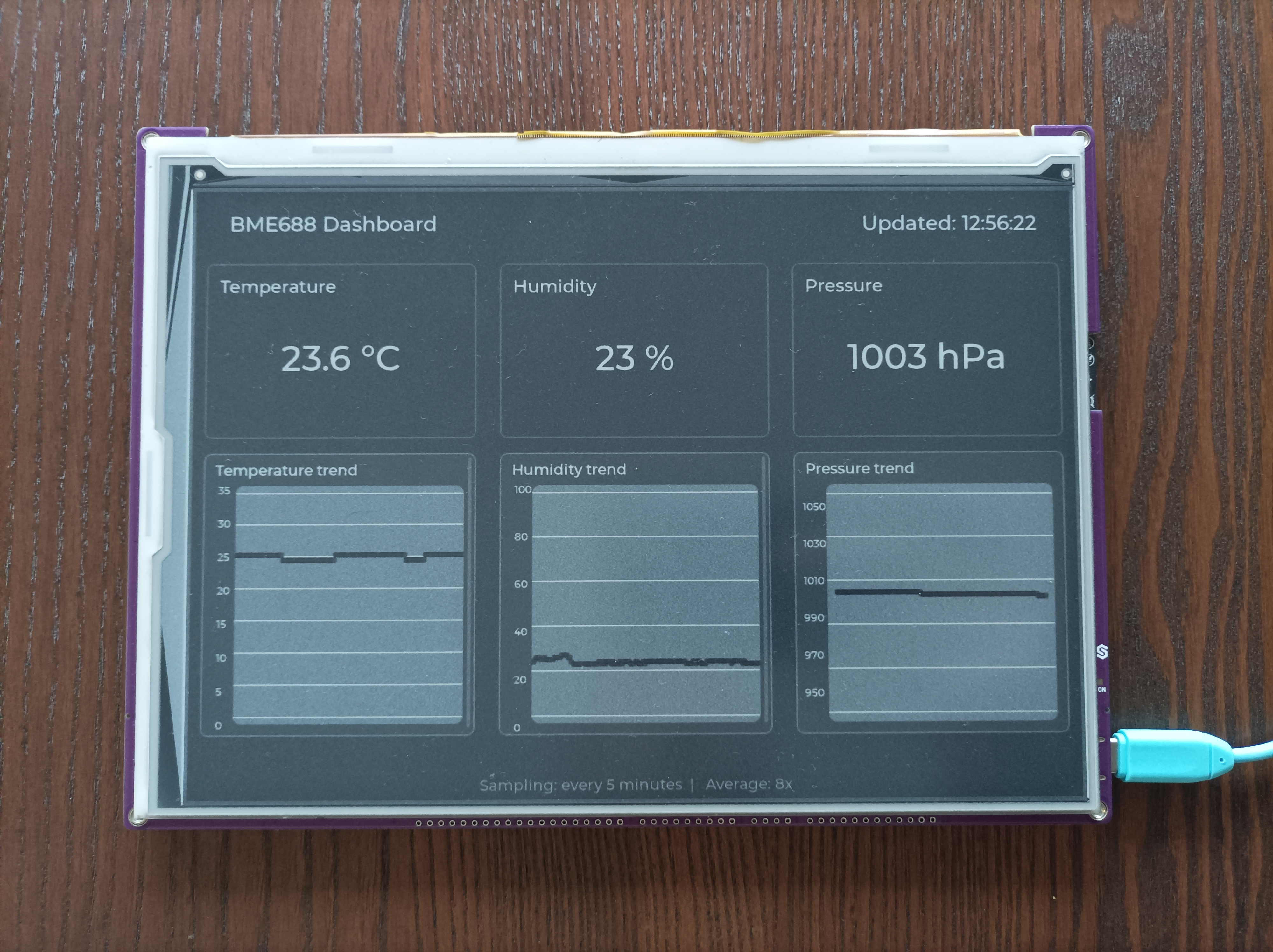
Show room temperatures, the weather, the next calendar event and the state of your doors on one screen. Inkplate fetches the data over Wi-Fi, redraws every few minutes and uses almost no power in between. Inkplate 10 has a 9.7-inch panel, enough for a full-room view.
3. Smart weather display
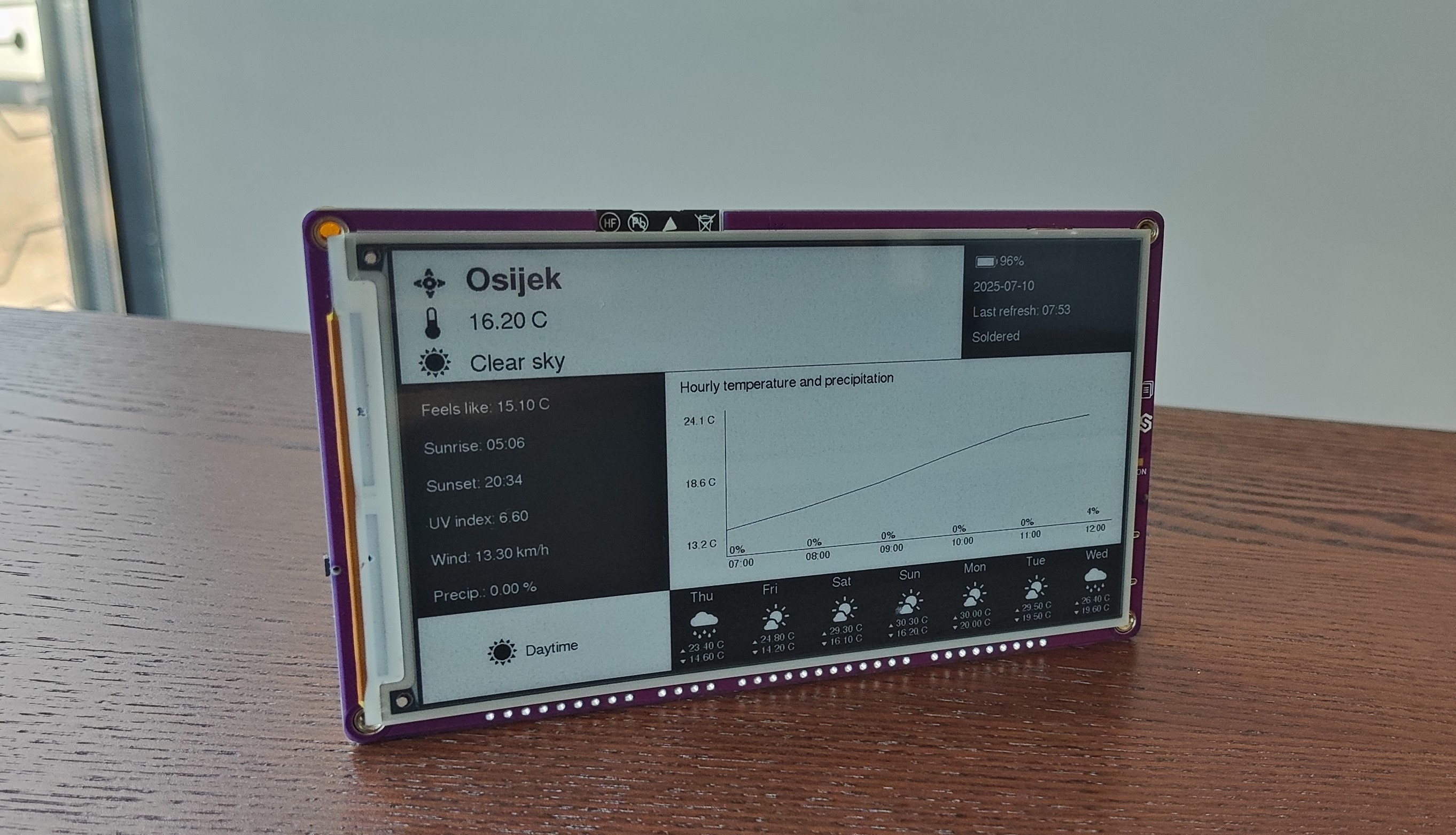
Pull the forecast from a free weather API and show it next to the indoor temperature. Updating every 30 minutes is plenty, and the screen stays readable from across the room. Inkplate 6COLOR adds colour for the icons.
4. Smart energy monitor
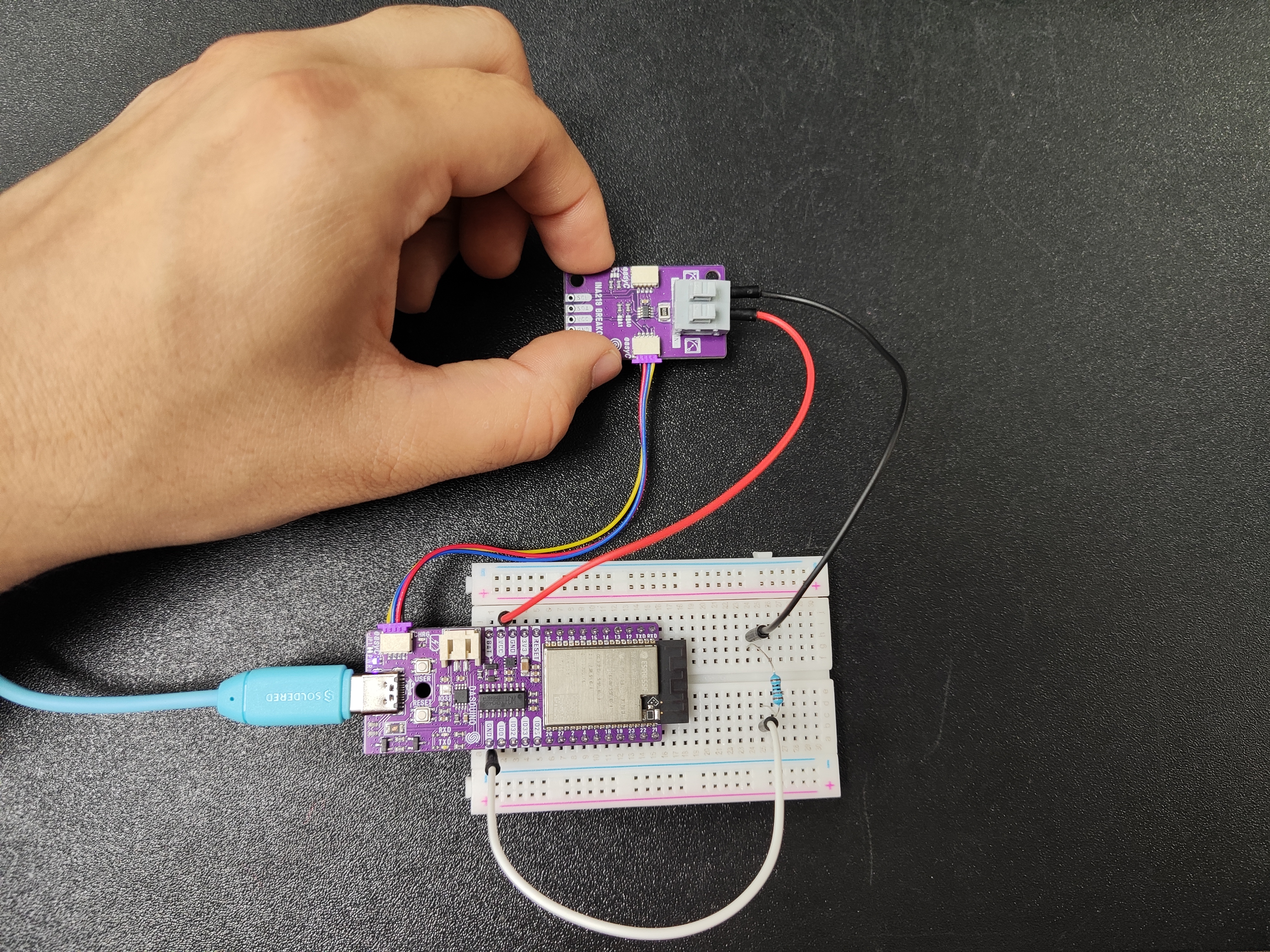
An INA219 measures voltage and current on a DC circuit, such as a solar panel, a battery or a USB device. Log it to Home Assistant, or draw a daily graph on an Inkplate 10. Do not measure mains wiring with it: it is a low-voltage sensor.
5. Smart mailbox notifier
A switch or tilt sensor on the mailbox flap wakes an ESP32, which sends one message and goes back to sleep. NULA DeepSleep ESP32-S3 draws about 16 µA while sleeping, so it can live in the mailbox on a battery.
6. Door or window status sensor
A reed switch and a magnet tell an ESP32 whether a door, window, cabinet or garage door is open. Send the state to Home Assistant and you can check the house from your phone, or get a reminder when you leave a window open.
7. Motion-activated hallway display
Refresh a hallway display only when someone walks past, so it shows fresh information without updating all day. Inkplate 6MOTION has a fast-refresh panel and a gesture and proximity sensor on board. For a separate motion trigger, use a PIR sensor with Qwiic.
8. Smart plant monitor
A capacitive soil sensor in the pot reports moisture to an ESP32. Get a notification when it drops below a threshold, or log it to see how fast each plant dries out. Capacitive sensors last longer than the bare-metal kind, because nothing corrodes.
9. Home office environment monitor
Track temperature, humidity and air quality in the room you work in. A BME688 measures all three plus gas, and an SCD43 measures real CO₂. Inkplate 2 is small enough to sit on the desk and show the one number that matters.
10. Smart garage parking assistant
An ultrasonic sensor on the garage wall measures how far the car is. Show the distance on a display, or switch an LED from green to red when you are close enough. The HC-SR04 runs on 5 V, so check the echo pin's voltage before connecting it to a 3.3 V ESP32.
11. Raspberry Pi Home Assistant hub
Install Home Assistant OS on a Raspberry Pi 5 and it becomes the hub for every other project on this list. It runs automations, stores history and serves the dashboard on your local network, with no cloud account needed. The 8 GB model leaves room for add-ons like a database or Node-RED.
12. Smart room availability sign
Put a sign by a meeting room, office or workshop door that shows whether the room is free and the next booking. Inkplate 5Gen2 refreshes fast enough to change the moment a meeting starts. Inkplate 6FLICK adds a touchscreen so people can book the room at the door.
13. Smart family calendar
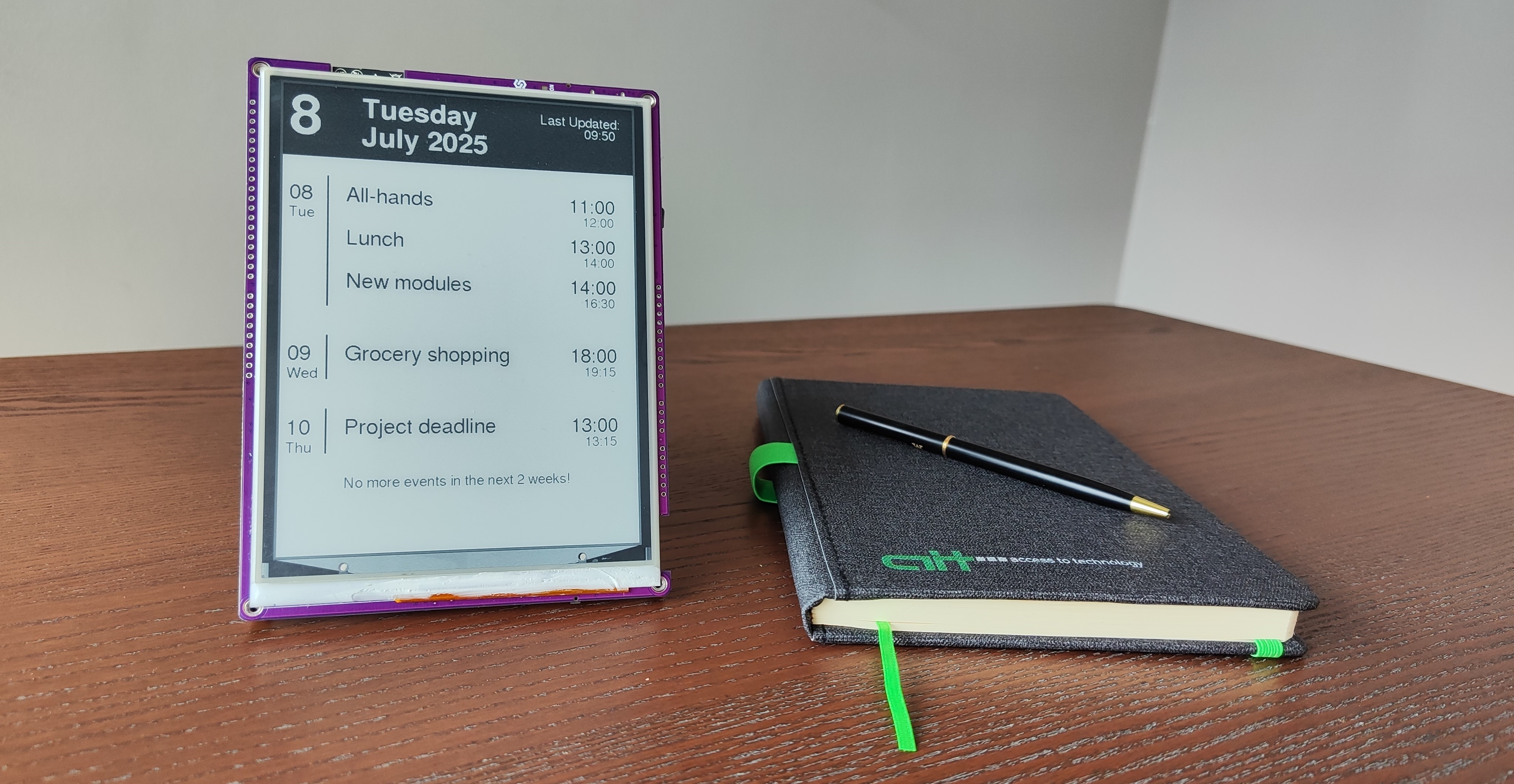
Connect an Inkplate to a shared Google Calendar and show the next two weeks on the kitchen wall. It updates a few times an hour and runs for weeks on one charge. Inkplate 10 fits a family's week; Inkplate 13SPECTRA gives each person a colour on a 13-inch panel.
14. Smart button for Home Assistant
A physical button by the door that turns off every light, starts a scene or sends a message. An ESP32 handles single, double and long presses as three different actions. The Zero to Hero kit teaches button handling from the first chapter.
15. Water leak detector
Lay a water level sensor on the floor next to the washing machine, sink or boiler. When it gets wet, the ESP32 sends an alert straight away. Run it on NULA DeepSleep ESP32-S3 so it can sit there for months without a cable.
16. Smart lighting controller
Switch an LED strip or lamp from a button, a motion sensor or a schedule in Home Assistant. A Qwiic relay board plugs into a NULA Mini ESP32-C6 with one cable. Keep DIY wiring to low-voltage loads; for mains lamps, have the wiring done by a qualified person.
17. Smart security camera with Raspberry Pi
Point a camera at the front door and let the Raspberry Pi record when something moves. The Raspberry Pi AI Camera runs object detection on the camera itself, so the Pi can tell a person from a cat without a cloud service.
18. Smart air quality display
Show CO₂, temperature and humidity on a colour display in the living room or bedroom. Turn the CO₂ reading red when it is time to open a window. Inkplate 6COLOR makes the warning obvious from across the room.
19. Server or network status display
Show whether the NAS, the router and Home Assistant are up, plus disk space and the internet speed. A script on a Raspberry Pi collects the numbers and an Inkplate draws them. Inkplate 6FLICK lets you tap through pages for each machine.
20. Smart workshop dashboard
A wall display in the workshop with project notes, a timer, the room temperature and a reminder of what is still on the bench. Inkplate 10 is big enough to read from the workbench.
How to connect smart home projects to Home Assistant
- ESPHome. Describe the sensor in a short YAML file, flash the ESP32, and Home Assistant finds it on its own. No code to write.
- MQTT. The ESP32 publishes readings to a broker, and Home Assistant subscribes. More work, but it works with any code and any board.
- Raspberry Pi. Run Home Assistant on the Pi itself and it becomes the hub the other devices report to.
- Inkplate. It can read values from the Home Assistant API, an MQTT broker or your own server, and draw them.
Start with one sensor and get it reporting reliably before adding automations. Our ESPHome MQTT guide walks through both routes, and our guide to Home Assistant e-paper displays covers the dashboard side.
Smart home project ideas by difficulty
| Beginner | Intermediate | Advanced |
|---|---|---|
| Room sensor | Weather dashboard | Raspberry Pi Home Assistant hub |
| Door or window sensor | Energy monitor | Smart security camera |
| Smart button | Home Assistant display | Server status display |
| Plant monitor | Room availability sign | Full smart home dashboard |
| Parking assistant | Smart lighting controller | AI-assisted camera project |
Common mistakes in DIY smart home projects
- A Raspberry Pi where an ESP32 would do. A Pi as a door sensor wastes power and money.
- An Arduino for a project that needs Wi-Fi. Start with an ESP32 instead of adding a Wi-Fi module later.
- No power plan. Decide on USB, mains adapter or battery before you build the enclosure.
- A normal screen for always-on information. E-paper stays readable all day for a fraction of the power.
- Everything in the cloud. If the internet goes down, local control keeps the lights working.
- Ten automations before one reliable sensor. Get the first device stable first.
- Unclear names in Home Assistant. "sensor_3" means nothing in six months. Name devices by room and job.
- No thought about placement. A temperature sensor next to the ESP32's own heat, or behind the TV, reads wrong.
-
Messy Wi-Fi or MQTT topics. Plan a topic layout like
home/kitchen/temperaturebefore you have twenty devices. - Batteries without deep sleep. An ESP32 that never sleeps empties a battery in a day or two.
Which smart home project should you build first?
Start with an ESP32 room sensor. It teaches the whole chain in one evening, and every later project reuses it.
- Build the room sensor.
- Send its readings over MQTT or ESPHome.
- See them in Home Assistant.
- Show them on an Inkplate dashboard.
- Add your first automation, such as a notification when the room gets too warm.
Our ESP32 projects for beginners and Raspberry Pi project ideas have more builds once this one works.
Why Soldered is a great place to start building smart home projects
Soldered makes the parts for every step of that path: beginner kits, NULA ESP32 boards, Qwiic sensors that plug together without soldering, Raspberry Pi hardware and Inkplate e-paper displays. Start with one sensor on your desk and grow it into a dashboard on the wall, with the same parts and the same code.
Frequently asked questions
What are the best smart home projects for beginners?
Room sensors, door and window sensors, smart buttons, plant monitors, parking assistants and simple Home Assistant dashboards. They are cheap, useful and easy to extend.
Can I build smart home projects with Arduino?
Yes, for simple control projects with buttons, relays, LEDs and basic sensors. For anything that needs Wi-Fi, an ESP32 is the better choice.
Can I build smart home projects with ESP32?
Yes. Built-in Wi-Fi and Bluetooth make it the usual board for sensors, MQTT and ESPHome devices, Home Assistant sensors and smart buttons.
Can I use Raspberry Pi for smart home projects?
Yes. It runs Home Assistant, Node-RED, dashboards, logging and camera projects. It is a hub, not a battery-powered sensor.
What is the best board for Home Assistant sensors?
Usually an ESP32: it is small, cheap and has Wi-Fi. It connects to Home Assistant through ESPHome or MQTT.
What can I display on a smart home dashboard?
Temperature, humidity, weather, calendar events, room status, energy use, server status, door and window states, lighting scenes and any Home Assistant value.
Is e-paper good for smart home dashboards?
Yes, for dashboards that do not animate. It is readable in daylight, uses power only when it changes, and suits room signs, weather displays, calendars and status boards.
Should I use Arduino, ESP32 or Raspberry Pi for smart home projects?
Arduino for simple electronics and control, ESP32 for connected sensors and Home Assistant devices, Raspberry Pi for hubs, dashboards, servers and cameras.


